
Edit Route Command
The Edit Route Command displays the Edit Route Dialog, allowing you to make changes to the route.
To edit a route, select it and press Enter or right-click on the selected route, and click .
The Edit Route dialog will appear, allowing you to make changes to the route.
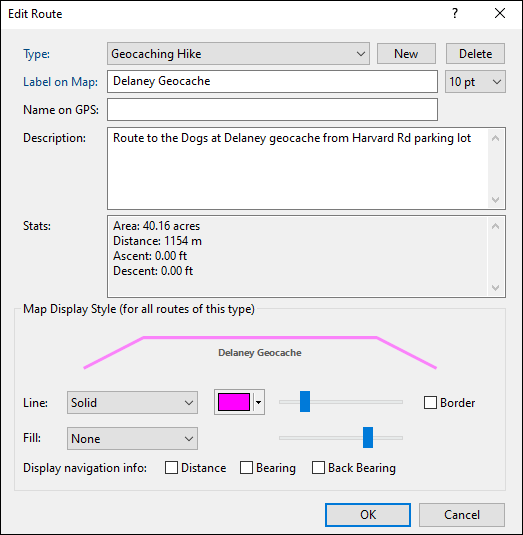
- Type
- Select a category for this route by choosing an existing Type from the drop-down list, or start typing to create a new Type. Learn more about working with types.
- Label on Map
- Enter the text to be displayed on the map.
- Text Size
- Set the font size for this route. This also sets the default text size for routes you create in the future.
- Name on GPS
- Enter a unique identifying name for your route. If your GPS identifies routes by name, this name will be sent to your GPS. ExpertGPS will automatically generate a route name as you type in the Label field.
- Description
- Enter a description of the route. This information is not sent to your GPS, but you can use it to store your own notes for future reference.
- Map Display Style (for all routes of this type)
- You can specify a unique map display style for each category (Type) of route that you create in ExpertGPS. For example, all of your driving routes could be a thick orange line, and all of your hiking routes could be a different color. You can use the Fill pattern and color for closed routes like a fence line or property border.
- Display Navigation Info
- Check these boxes to display the distance, bearing, and back-bearing for each leg of the route. You may need to zoom in on the map.



© 1998-2024 TopoGrafix – 24 Kirkland Dr, Stow, MA – Email: support@expertgps.com