
Edit Waypoint Command
The Edit Waypoint Command allows you to edit your GPS waypoints to include your notes and extra information. The extra information you include will make your waypoints more meaningful to you in the future, and will allow you to share them with others.
To edit a waypoint, select it and press Enter or right-click on the selected waypoint, and click .
The Edit Waypoint dialog will appear, allowing you to make changes to the waypoint.
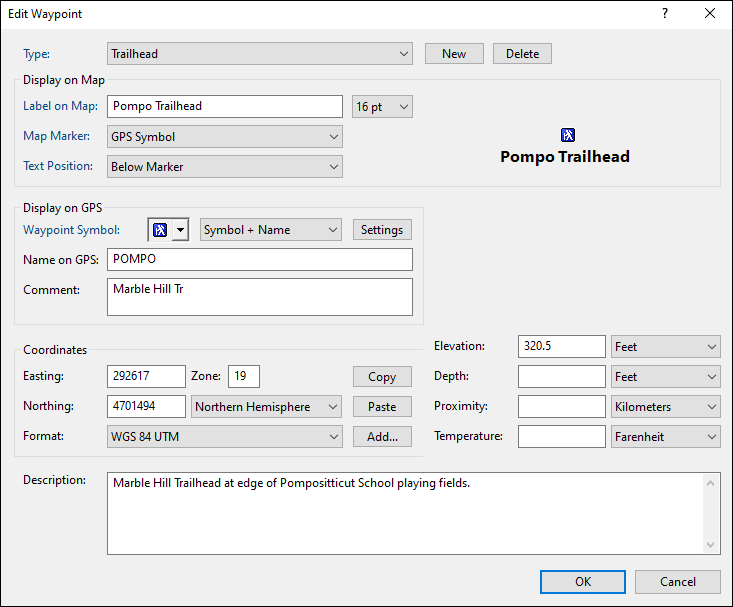
- Type
- Select a category for this waypoint by choosing an existing Type from the drop-down list, or start typing to create a new Type. Learn more about working with types.
- Label on Map
- Enter the text to be displayed on the map.
- Text Size
- Set the font size for this waypoint. This also sets the default text size for waypoints you create in the future.
- Map Marker
- Choose whether the map should display the GPS Waypoint Symbol or a different marker image.
- Text Position
- Set the label position on the map.
- Waypoint Symbol
- The GPS symbol is automatically chosen when you select a Type at the top of the dialog. If you select a symbol here, it will be used as the default Waypoint Symbol for all future waypoints of this Type. Click Settings to open the Received Waypoint Types dialog.
- Name on GPS
- Enter a unique identifying name for the waypoint. This name will be displayed on your GPS. For a new waypoint, ExpertGPS will automatically generate a waypoint name when type in the Label field.
- Comment
- Enter a short description of the waypoint to display on your GPS. Some GPS receivers do not display comments. ExpertGPS will automatically generate a comment as you type in the Description field.
- Coordinates
- Enter the coordinates of the waypoint in the Edit Coordinates dialog.
- Elevation
- Enter the elevation of your waypoint.
- Depth
- If this waypoint marks a fishing location, enter the water depth.
- Proximity
- To have your GPS alert you when you approach this waypoint, enter a proximity distance. An orange circle of this radius will be drawn around the waypoint on the map.
- Temperature
- If this waypoint marks a fishing location, enter the water temperature.
- Description
- Enter a description of the waypoint. This information is not sent to your GPS, but you can use it to store your own notes about the waypoint location.



© 1998-2024 TopoGrafix – 24 Kirkland Dr, Stow, MA – Email: support@expertgps.com